The video editor for the AI era
A fast, native editor you drive yourself, or hand to Claude Code, Codex, Cursor or any MCP client. Their edits land live on your timeline, and every one can be undone.
Version 0.4.1 · Intel Mac · Other platforms
Your agent, on your timeline
Liemo has an MCP server built in. Ask for a cut in plain words and the agent builds it from the same tools you use: clips, effects, transitions and titles. Then it renders a frame to check its own work.
- Projects
- List, create in any format, open in the editor.
- Timeline
- Add footage, music, overlays and text. Move, trim, split, duplicate.
- Look
- 100+ effects and filters, transitions, fades, transforms.
- Check
- Render a frame as an image to see the result.
- Deliver
- Export MP4, WebM, GIF, stills or audio.
Make a 15-second Reel from the coast footage. Call it “Summer, slowly”, warm the colour up and put some music under it.
- create_project format: "reel", name: "Summer, slowly"
- add_clip asset: "sc-coast", duration: 8
- add_clip asset: "sc-surf", start: 8, duration: 7
- set_transition transition: "dissolve", duration: 1
- apply_effect effect: "ig-golden", amount: 0.8
- add_text style: "tx-title", content: "Summer, slowly"
- add_clip asset: "mu-golden"
- render_frame time: 1.5
 Summer, slowly00:00:01:15
Done: a 15-second Reel. The title sits over the cliffs for three seconds, then dissolves into the surf with Golden hour on both shots. It's open in Liemo, and ⌘Z undoes any of it.
Inside the editor
Liemo AI
Open the AI sidebar and chat. It uses the coding agent you already have installed and signed in to, so there's no new account and no key.
- Claude Code
- Codex
- Gemini CLI
- Cursor
- GitHub Copilot
- OpenCode
- Qwen Code
- Grok
- Amp
From any MCP client
Connect from outside
While Liemo is open, edits appear in it live. When it's closed, the agent edits the project files directly.
claude mcp add liemo -- /Applications/Liemo.app/Contents/MacOS/Liemo mcp
{
  "mcpServers": {
    "liemo": { "command": "/Applications/Liemo.app/Contents/MacOS/Liemo", "args": ["mcp"] }
  }
}A real editor first
The AI is optional. Everything it can do, you can do by hand, at full speed, with no network connection. Native, GPU-accelerated, written in Rust.
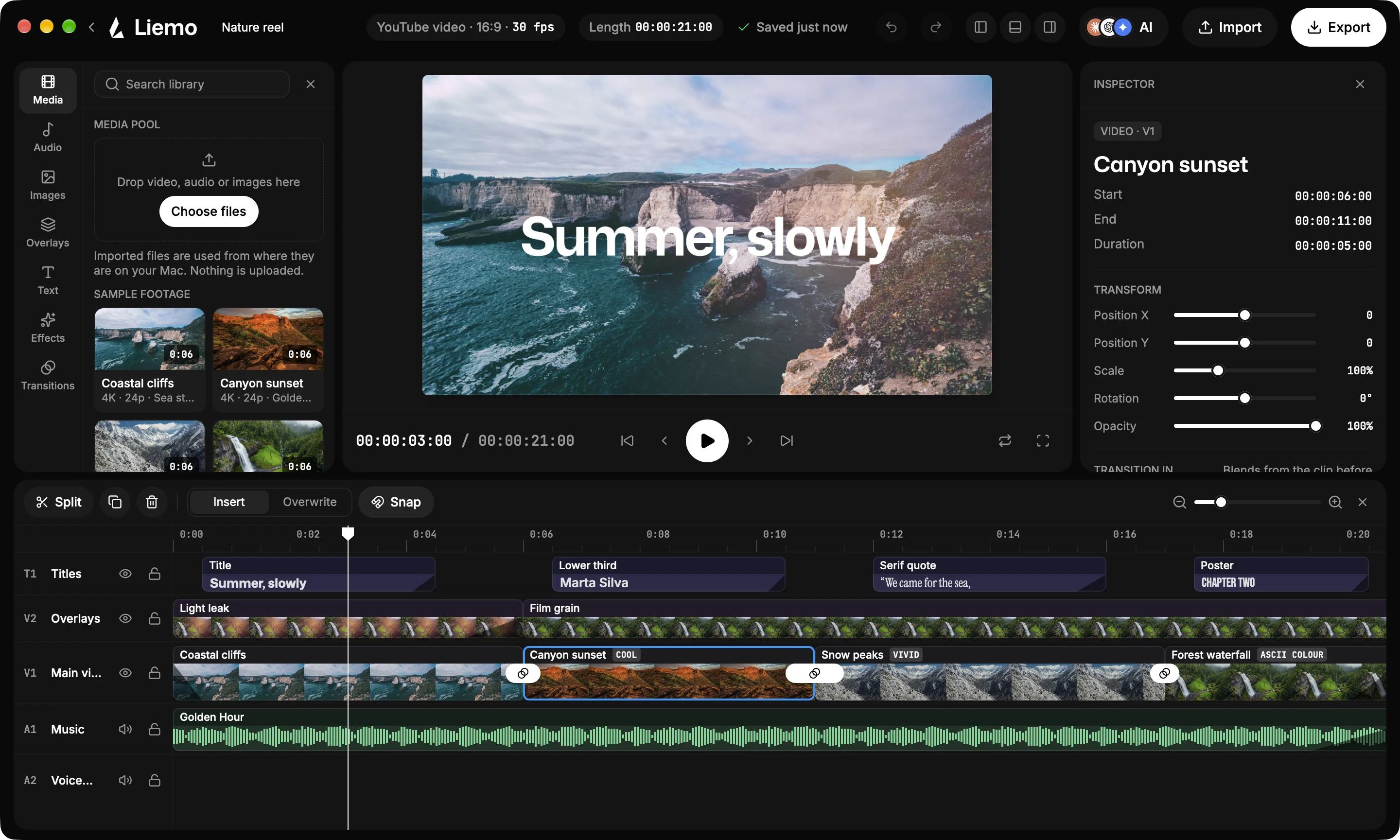
01
A frame-accurate timeline
Titles, overlays, main video, music and voice tracks in HH:MM:SS:FF. Insert and overwrite, snapping, split, and undo for everything.
02
100+ looks
Instagram-style filters, film and mood grades, and shader filters like VHS and ASCII that run on the GPU. Stack them; set how strong each one is.
03
Transitions on the GPU
Fifty of them: dissolves, pushes, dips, Thirds and shader transitions, blended right across the cut.
04
Remove the background
Cut out the subject with Apple's Vision on Mac, iPhone and iPad, then feather, outline or blur what's behind. Chroma key works everywhere.
05
Titles, even in 3D
Title, lower third, quote and poster styles, stacked on one track. Tilt text in perspective, outline it, or let it invert what's under it.
06
Every shape, every export
YouTube, Reels, TikTok, square or any custom size at 24 to 60 fps. Out as MP4, WebM, GIF, stills, WAV or M4A.
No account, no server
There's no Liemo server and nothing to sign up for. No analytics, no ads, no tracking.
Your files stay put
Footage is used from where it is on your disk. Nothing is uploaded; exports land in Downloads.
Open source, MIT
Read it, build it, change it. The editor, its renderer and the MCP server are all on GitHub.
Edit your next video with Liemo
Free and open source, version 0.4.1. Signed and notarised on the Mac, where it keeps itself up to date.
- MacApple silicon · .dmgDownload
- MacIntel · .dmgDownload
- Windowsx86_64 · .zipDownload
- Linuxx86_64 · .tar.gzDownload
- iPhone & iPadApp StoreComing soon
Linux needs FFmpeg 6 or newer and a Vulkan driver. Windows includes FFmpeg.